Lua Script Engine
Load community Lua scripts and standalones straight from the built-in script browser — the biggest reason modders pick Cherax over simpler menus.
Cherax Mod Menu is a premium GTA 5 mod menu — money recovery, Lua scripting, total modder protections and a full vehicle spawner in one clean interface. Grab the latest 2026 build straight from the official site.
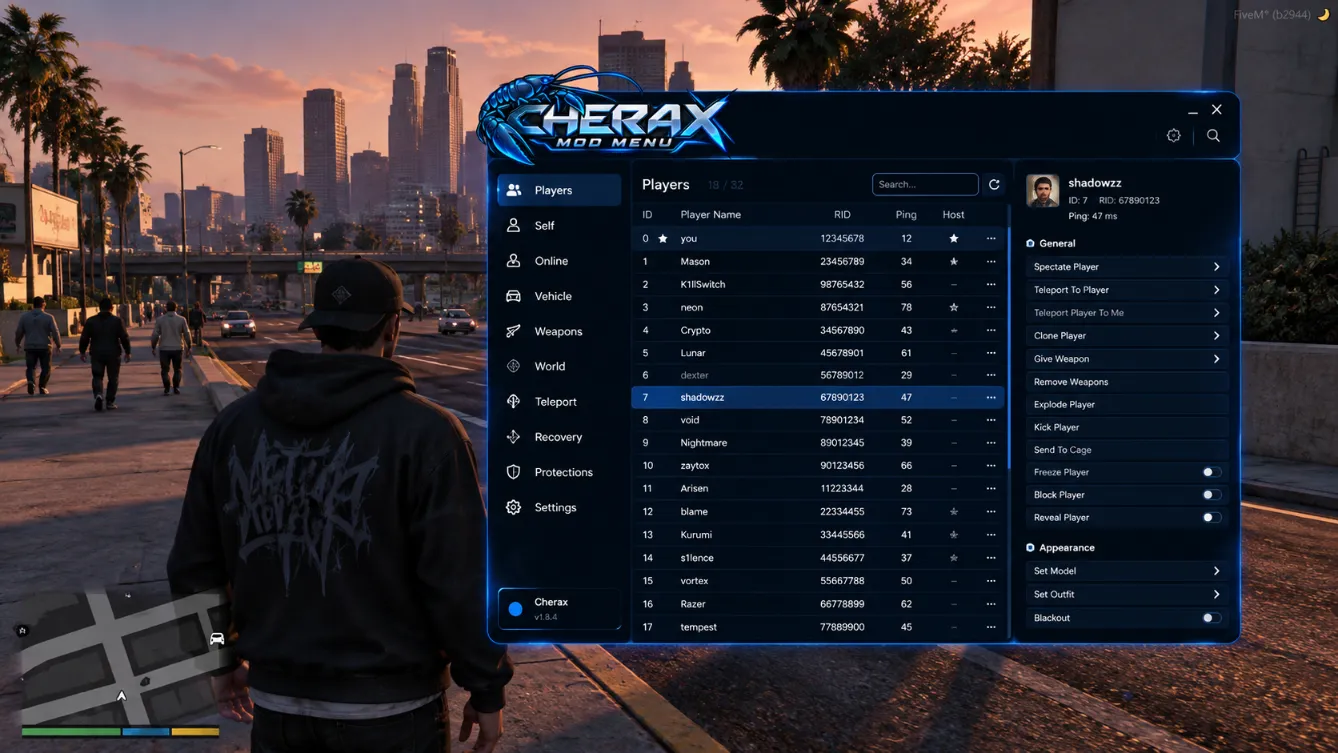
Cherax Mod Menu is a feature-packed GTA V mod menu with a tabbed, beginner-friendly UI. It injects into both Legacy and Enhanced editions of Grand Theft Auto V and unlocks self, vehicle, weapon and online options — plus a built-in Lua script engine that runs thousands of community scripts. A dedicated dev team ships bypass updates within hours of GTA Online patches, which is why Cherax has stayed one of the most trusted mod menus since 2019.
Once the loader is running, Cherax hooks into the game process and renders its own menu inside GTA 5. Every option — from god mode to money drops — is executed locally in your session, while the built-in protection layer filters malicious traffic from other modders in your lobby. Lua scripts run in a sandboxed runtime, so you can extend the menu without touching game files.
Rockstar now ships two PC editions of GTA V, and Cherax supports both. The loader detects your game version automatically and pulls the matching build — so whether you stayed on Legacy for stability or moved to Enhanced for the ray-tracing upgrades, the same download covers you. Switching editions later doesn't require a second license or a fresh install: just launch the loader again and it re-injects the right profile.
| Current version | v1.8.4 · Oct 23, 2026 |
|---|---|
| File size | 84 MB (.zip) |
| Platform | Windows 10 / 11 · 64-bit |
| Game versions | GTA V Legacy & Enhanced |
| Price |
Free loader (license for full access)
|
| Developer | Cherax Team — LeviZukerberg (GitHub) |
| Status | Undetected (live) |
| Community rating | 4.24 / 5 · 126 reviews |
Everything the Cherax mod menu packs into one clean in-game UI.
Load community Lua scripts and standalones straight from the built-in script browser — the biggest reason modders pick Cherax over simpler menus.
Money options, level boosts and full unlock lists — rank, weapons, cosmetics and businesses unlocked in minutes, not weeks of grinding.
Spawn any of hundreds of cars and bikes with saved presets, custom tuning and instant plate changes — searchable by name, straight from the Vehicles tab.
Block crashes, kicks, freezes and camera traps from other modders — one of the strongest protection suites in the GTA 5 scene.
Dedicated casino tools and a Cayo Perico heist helper — prep skipping, loot multipliers and instant finale replay, tuned after every patch.
God mode, infinite ammo, teleport, weapon drops and the full Players toolkit (see the screenshot above) for yourself and your lobby.
Weather, time, blacklist, bounty and lobby tools — take full control of any GTA Online session without leaving the menu.
Bypass and feature updates land within hours of GTA Online patches — v1.8.4 dropped the same day the last update went live.
From download to an open menu in under two minutes — then a detailed walkthrough and every fix you may need.
Get the Cherax loader from the download page — one archive covers both Legacy and Enhanced builds.
Unzip the archive. If your antivirus flags the loader, add an exclusion — it's a known false positive, not a virus.
Start the Cherax loader with admin rights, then launch GTA 5. Injection happens automatically in the background.
Press F4 (default hotkey) to open the Cherax Mod Menu. Rebind keys in Settings → Hotkeys.
Total time from download to an open menu is under two minutes on an average PC. If anything goes wrong along the way, the troubleshooting list below covers every known case.
Grab cherax-v1.8.4.zip from our download page only. Inside you'll find Cherax.exe, the profile picker and a readme with the build's SHA-256 checksum — compare it before installing to be sure the file is untouched. Re-download if the sizes don't match.
Right-click the archive → Extract All to a simple path like C:\Cherax (avoid OneDrive-synced folders — they lock the loader mid-inject). If Windows Defender or a third-party antivirus quarantines Cherax.exe, restore it and add the whole folder to exclusions. This is a false positive: the loader is packed, which is standard for game mods.
Right-click Cherax.exe → Run as administrator. The loader needs elevated rights to attach to the GTA V process. Pick your edition in the profile picker (Legacy or Enhanced) — it's auto-detected in most cases. Then launch GTA 5; the loader prints “Injected successfully” when it hooks the game.
Once you're in Story Mode or GTA Online, press F4 to open the menu. First things to check: Protections → enable all, then Settings → Hotkeys if you want a different menu key. The loader self-updates, so next time a Rockstar patch drops, just run it again and it pulls the newest bypass automatically.
Your antivirus silently quarantined it. Open the quarantine, restore Cherax.exe, add the folder to exclusions, then run it as administrator again. If it still vanishes, your third-party AV has “self-protection” blocking restores — temporarily disable it, extract again, re-enable.
Two usual causes: the loader wasn't started as administrator, or GTA 5 hasn't fully loaded yet. Run the loader with admin rights, wait until you reach the story mode / online lobby screen, and only then start the loader if auto-inject didn't fire.
The hotkey may be rebound or intercepted. Check Settings → Hotkeys inside the loader config, unbind F4 from any overlay (GeForce Experience, Discord, Rivatuner), and if you play on controller, test with a keyboard first. Deleting settings.json in the Cherax folder resets all keybinds.
Almost always a build mismatch: a Legacy profile injected into Enhanced (or vice versa). Open the loader, switch the profile to match your edition, and make sure you're on the latest loader version — v1.8.4 supports both editions cleanly.
That's patch-day behavior: Rockstar shipped a new update and the bypass needs to catch up. Cherax historically pushes the fix within hours — watch the status badge at the top of this page, and run the loader again once it flips back to Undetected.
Click More info → Run anyway. SmartScreen warns about unsigned executables with few downloads — the official loader is not signed, so the warning is expected. Verify the SHA-256 checksum from the readme if you want certainty before running.
The in-game renderer can cost a few frames. Enable performance mode in Cherax settings, close third-party overlays, and don't leave the menu open during heist finales. On low-end PCs, capping the menu render rate to 30 FPS removes the stutter completely.
Check for typos and trailing spaces first (copy-paste the key, don't retype it). One key is bound to one PC — if you changed hardware, use the free reset in your account once per month. Still failing? Contact support through this site with your order ID; keys bought from resellers occasionally need manual activation.
"Is Cherax a virus", "is it safe", "is it bannable" — the questions that dominate Reddit, answered with straight facts.
No. The loader uses code packing and obfuscation — standard for mod menus — which some antiviruses flag as a false positive. The official build's SHA-256 checksum is published so you can verify every download.
Cherax has been used by hundreds of thousands of players since 2019 and ships a full anti-crash / anti-kick suite. Always download from cherax.app — most "Cherax virus" reports trace back to cracked re-uploads.
Any GTA Online modding violates Rockstar's ToS and carries a ban risk. Cherax is patched quickly after detection waves and risky features can be disabled — but a secondary account is the safe play.
Only cherax.app distributes official builds. Fakes ask for your Rockstar password, hide the file behind adware installers, or ship no checksum. The official loader never asks for your GTA credentials.
How Cherax stacks up against the other big names — community consensus, 2026.
Picking a menu usually comes down to three questions: how fast it updates after a patch, how deep the protections go, and how much you can do without touching a single script. That's exactly what "Cherax and Stand mod menu" and "Lexis vs Cherax mod menu" threads on Reddit argue about every week — below is the short version for the three menus players most often weigh against Cherax.
Stand is minimal and script-heavy — great for tinkerers. Cherax matches its Lua power but adds a friendlier tabbed UI, deeper recovery and casino tools out of the box.
Lexis packs a dense feature set, but updates historically land 1–2 days after patches. Cherax ships bypasses within hours and its Players tab is easier to navigate.
Absolute is a solid mid-tier menu. Cherax beats it on script selection, protection depth and update cadence — the reasons most streamers run Cherax.
| Feature | Cherax | Stand | Lexis | Absolute |
|---|---|---|---|---|
| Lua scripting | ✔ + script browser | ✔ | ✔ | Partial |
| Protections | Full suite | Full suite | Full suite | Basic |
| Recovery, casino & Cayo Perico | Deep | Partial | Deep | Partial |
| Interface | Tabbed, beginner-friendly | Minimal, script-heavy | Dense, advanced | Classic |
| Update speed after patches | Within hours | Within hours | 1–2 days | 1–2 days |
| Free loader + license | ✔ | ✔ | ✔ | ✔ |
Comparison reflects community feedback and may change with updates.
Real ratings from GTA 5 players — aggregated from Cherax Mod Menu Reddit threads, community hubs and this site's users.
Running Cherax in every session for 8 months. Protections have blocked every crash attempt other modders threw at me, and the Lua script loader just works. Best menu I've used.
Fast updates after the last GTA Online patch and the casino tools are unreal. Docked one star because the first inject needed a manual antivirus exclusion.
The Cayo Perico helper paid for itself in a weekend. Clean UI — my little brother learned it in ten minutes.
+ 123 more community reviews
Run the loader as administrator, start GTA 5, then press F4 (default hotkey) to open the menu. The key can be changed in Settings → Hotkeys.
No — the flag is an antivirus false positive caused by code packing. Verify the published SHA-256 checksum, and check the independent VirusTotal and Google Safe Browsing reports.
Hundreds of thousands of players have used Cherax since 2019. It ships a full anti-crash, anti-kick and anti-freeze suite. Always download from cherax.app — most "Cherax virus" reports trace back to cracked re-uploads.
Yes, all GTA Online modding carries a ban risk. Cherax updates fast after detection waves, but we recommend a secondary account for risky features.
Yes. The loader ships separate profiles for GTA V Legacy and GTA V Enhanced, both updated after every Rockstar patch.
Check the live status badge in the hero section — it reflects the current undetected/down state. Cherax outages are rare and are usually resolved within hours.
Only cherax.app distributes official builds. Fakes ask for your Rockstar credentials, hide the file behind adware installers, or ship no checksum. The official loader never asks for your GTA password.
Run the loader as administrator, whitelist it in your antivirus, and make sure the build matches your game version (Legacy vs Enhanced). These three steps fix 99% of launch errors — the full list lives in the troubleshooting guide.
Free Cherax Mod Menu download — 84 MB official loader. Fast install, menu opens with F4. Updated for GTA Online.
Download Cherax — Free
Leave a Comment
Share your experience with Cherax Mod Menu — your feedback keeps the community safe from fakes.